Skip to content

Free shipping on orders over $150 · Custom orders open

Class

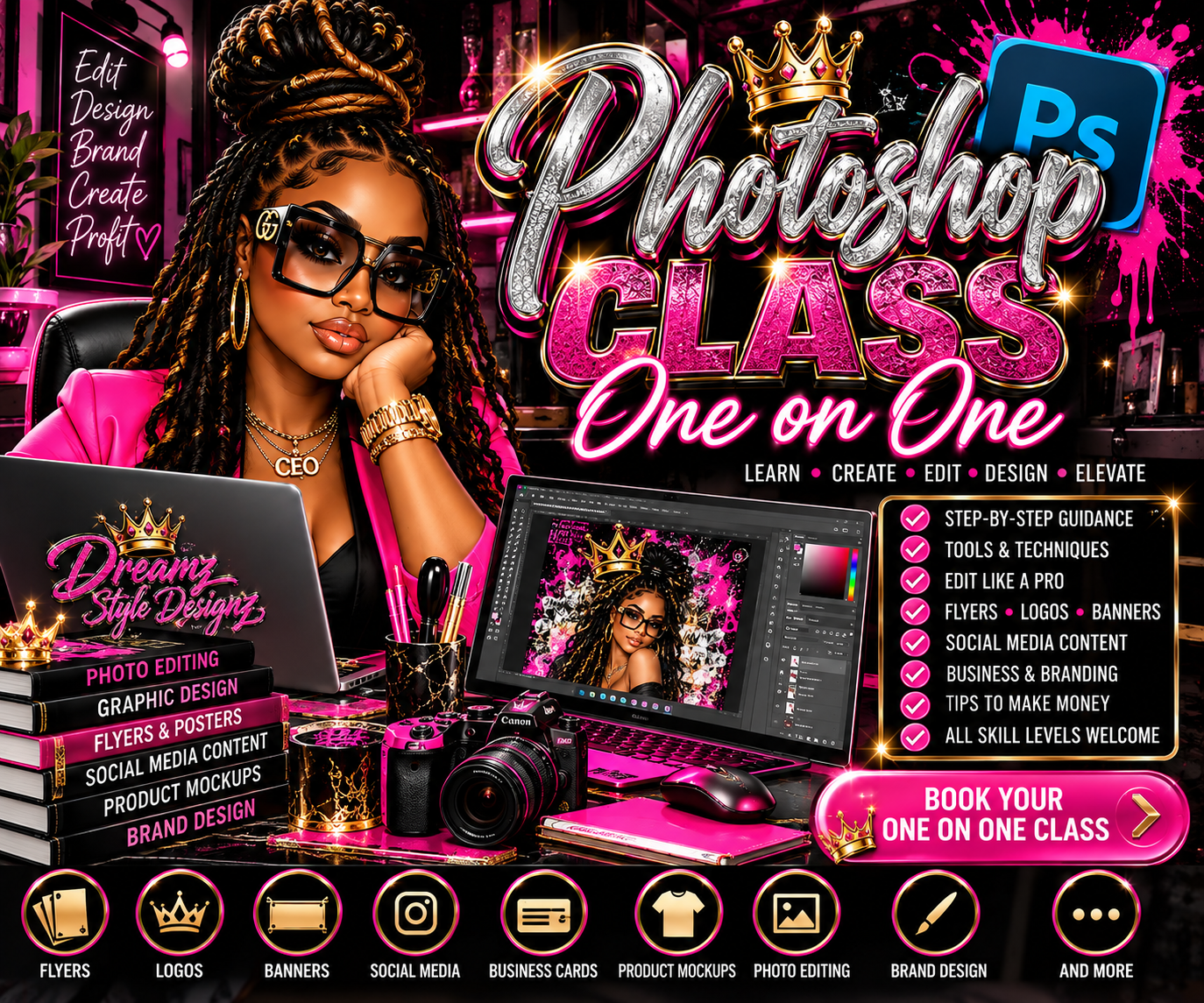
Photoshop One-on-One Class | Personalized Design & Photo Editing Training

$150

Learn Photoshop with personalized one-on-one training. Master photo editing, flyers, banners, social media graphics, product mockups, branding and more with step-by-step guidance for beginners and creators.

Duration
60 minutes
Skill level
All levels
Format
One-on-one
Location
Online

What you will learn

✨ Photoshop basics & workspace setup ✨ Layers, masks & blending modes ✨ Selections & background removal ✨ Photo editing & enhancements ✨ Color correction ✨ Working with fonts & typography ✨ Creating professional flyers ✨ Posters & banners ✨ Social media graphics ✨ Business cards & marketing materials ✨ Product mockups ✨ Apparel graphics ✨ Branding designs ✨ Working with brushes, effects & styles ✨ Preparing artwork for print ✨ Exporting PNG, JPEG, PDF and other formats ✨ Creating designs and products you can monetize

What's included

✨ Photoshop basics & workspace setup ✨ Layers, masks & blending modes ✨ Selections & background removal ✨ Photo editing & enhancements ✨ Color correction ✨ Working with fonts & typography ✨ Creating professional flyers ✨ Posters & banners ✨ Social media graphics ✨ Business cards & marketing materials ✨ Product mockups ✨ Apparel graphics ✨ Branding designs ✨ Working with brushes, effects & styles ✨ Preparing artwork for print ✨ Exporting PNG, JPEG, PDF and other formats ✨ Creating designs and products you can monetize

Pay first, then choose your date and time from the available schedule right after checkout.

Schedule after purchase
FROM “I DON'T KNOW WHAT I'M DOING” TO “WAIT…I MADE THAT?!” 🔥💻 Ready to stop being intimidated by Photoshop and start creating designs that actually look PROFESSIONAL? Book your One-on-One Photoshop Class with Coach Laverne and get personalized, step-by-step instruction based on your current skill level and what YOU want to learn. Whether you're brand new to Photoshop or you've been using it but want to take your designs to the next level, this private session gives you dedicated time to learn, create, edit and elevate your skills. No trying to keep up with 20 other students. No being scared to ask the same question twice. 😂 It's you, your project and personalized guidance. 💻 WHAT WE CAN COVER Your session can be customized around the Photoshop skills you need, including: ✨ Photoshop basics & workspace setup ✨ Layers, masks & blending modes ✨ Selections & background removal ✨ Photo editing & enhancements ✨ Color correction ✨ Working with fonts & typography ✨ Creating professional flyers ✨ Posters & banners ✨ Social media graphics ✨ Business cards & marketing materials ✨ Product mockups ✨ Apparel graphics ✨ Branding designs ✨ Working with brushes, effects & styles ✨ Preparing artwork for print ✨ Exporting PNG, JPEG, PDF and other formats ✨ Creating designs and products you can monetize 👑 BEGINNER? YOU'RE WELCOME HERE. Never opened Photoshop before? Come on. We're starting from the beginning. 💕 Already know the basics but you're trying to figure out how designers create those layered, dramatic, high-impact graphics? We can work on that too. 🔥 Your class is tailored to your experience instead of forcing you through information you already know—or jumping so far ahead that you're completely lost. 🎨 BRING YOUR OWN PROJECT Have something specific you've been trying to create? Bring it! We can work on your flyer, sports design, memorial design, banner, social media graphic, business branding, product mockup or another project while you learn the Photoshop techniques behind it. The goal isn't just to watch me create. I want YOU learning how to create it. 💰 LEARN • CREATE • EDIT • DESIGN • ELEVATE Photoshop can be more than another program sitting on your computer. Learn skills you can use to create products and services for your own business, including: Flyers • Logos • Banners • Social Media Content • Business Graphics • Product Mockups • Photo Editing • Brand Designs & More 📅 HOW BOOKING WORKS 1. Purchase your One-on-One Photoshop Class. 2. Choose your available date and time through the scheduling calendar. 3. Tell me your current skill level and what you want to learn. 4. Receive your booking confirmation and session details. 5. Come ready to CREATE. 👑🔥 🖥️ WHAT YOU'LL NEED For the best learning experience, you should have: 💻 Desktop or laptop 🎨 Adobe Photoshop installed and working 🌐 Reliable internet connection 🖱️ Mouse recommended 📁 Any photos, logos or project files you'd like to work with Adobe Photoshop is NOT included with your class purchase. ⚠️ CLASS & BOOKING POLICY Your purchase reserves dedicated one-on-one training time. Please arrive on time and prepared for your session. Late arrival may reduce the amount of training time available. Rescheduling and cancellations are subject to the booking policy provided during checkout. The class is educational and does not guarantee specific income or business results. What you accomplish will depend on your starting skill level, participation, practice and the topics covered during your session.

Reviews

All reviews are from real customers and approved by the studio before publishing.
Write a review

No reviews yet — be the first.

You may also love

Dreamz Soundtrack

Say My Name Slow

0:000:00
35%